記得剛接觸魔法風雲會這款集換式卡牌遊戲是大二時,以前對於卡牌遊戲的認知是遊戲王這款紅片大街小巷的動畫和漫畫,後來對於這種沒有魔法使用限制及強力卡片太多的遊戲感覺非常的無力,似乎遊戲商為了吸引玩家的購買力而越出越強力的卡片,雖然多變的卡牌效果及COMBO非常的吸引人,但玩起來卻讓人有種無力感,感覺不管怎麼打都沒有辦法平衡遊戲。
後來接觸了爐石傳說的線上卡牌遊戲,發現了法力限制及循序漸進的打法,讓我感受到了卡牌遊戲的真正魅力,畢竟不是誰都想要被第一回合OTK或是破壞遊戲的體驗,經過大學認識的朋友發現了另一款跟我年紀一樣大的集換式卡牌遊戲-魔法風雲會,雖然魔法風雲會的法力限制來自於卡組中的地牌,有時會卡地或是滿手地牌沒招沒怪,但是魔風每幾個月的環境變化及每次新出的不同異能讓我看到了平衡及發展遊玩性,本來是在起源時加入的魔法風雲會,不過後來因為當兵的原因脫離了一陣子,最近又回鍋玩起了阿芒凱的環境,店家提供的新手套牌和適合新手加入的輪抽賽讓我很快的弄懂了玩法及牌組優缺點,七月又要新出一個小環境,阿芒凱的小環境-幻滅時刻。讓我非常的期待,之後的魔法風雲會也要改成三個月初一個大環境,讓魔風本身的故事內容更加的連貫,且卡片的異能也較之前的環境能銜接上,個人推薦新接觸卡牌遊戲及桌遊的玩家入手這款遊戲,了解更多魔法風雲會的故事和加入這個神奇的異世界。

敏晟 發表在 痞客邦 留言(0) 人氣()

常常在點名或是抽籤不能重複抽籤
這時候要怎麼做呢?
using System;
using System.Collections.Generic;
using System.ComponentModel;
using System.Data;
using System.Drawing;
using System.Linq;
using System.Text;
using System.Windows.Forms;

敏晟 發表在 痞客邦 留言(0) 人氣()

使用二維陣列的方式寫出按扭矩陣
using System;
using System.Collections.Generic;
using System.ComponentModel;
using System.Data;
using System.Drawing;
using System.Linq;
using System.Text;
using System.Windows.Forms;

敏晟 發表在 痞客邦 留言(0) 人氣()

按鈕陣列
今天老師教我們如何寫按扭矩陣,方便製造多數按鈕的狀況下使用。
 
using System;
using System.Collections.Generic;
using System.ComponentModel;
using System.Data;
using System.Drawing;
using System.Linq;
using System.Text;
using System.Windows.Forms;


namespace WindowsFormsApplication7
{
    public partial class Form1 : Form
    {

        System.Windows.Forms.Button Button1;

        System.Windows.Forms.Button[] Buttons;


        public Form1()
        {
            InitializeComponent();
        }

        private void Form1_Load(object sender, EventArgs e)
        {

            mybuttons();
            //Button1 = new System.Windows.Forms.Button();
            //Button1.Location = new Point(100, 100);
            //Button1.Click += new EventHandler(Button1_Click);
            //this.Controls.Add(Button1);

        }

        private void Button1_Click(object sender, EventArgs e) 
        { 
             MessageBox.Show("我是台好車,來開我"); 
        }


        private void mouseClick(object sender, MouseEventArgs e)
        {
            if (e.Button == MouseButtons.Left)
            {
                MessageBox.Show("hello");
            }
        }


        private void Button_Click(Object sender, EventArgs e)
        {
            //Button button = (Button)sender;
            //button.Text = button.Name;
            MessageBox.Show("hello");
        }

        private void mybuttons()
        {
            int width, height;
            // Button1 = new System.Windows.Forms.Button();
            // Button1.Location = new Point(100, 100);
            // this.Controls.Add(Button1);
            width = 100;
            height = 100;

            Buttons = new System.Windows.Forms.Button[9];


            for (int i = 0; i < 9; ++i)
            {

                Buttons[i] = new Button();
                //:::size:::
                Buttons[i].Size = new Size(width, height);
                Buttons[i].Text = i.ToString();
                Buttons[i].BackColor = Color.Red;
                              
                Buttons[i].Click += new System.EventHandler(this.Button_Click);
                //Buttons[i].Click += OnClick;
                this.Controls.Add(Buttons[i]);

                if (i <= 2)
                    Buttons[i].Location = new System.Drawing.Point(100 + i * 100, 10);
                else if (i > 2 && i <= 5)
                    Buttons[i].Location = new System.Drawing.Point(100 + (i - 3) * 100, 110);
                else if (i > 5 && i <= 9)
                    Buttons[i].Location = new System.Drawing.Point(100 + (i - 6) * 100, 210);
            }


        }

        private void button2_Click(object sender, EventArgs e)
        {
            MessageBox.Show("我是台好車,來開我"); 
        }
    }
}

敏晟 發表在 痞客邦 留言(0) 人氣()

井字遊戲
今天上C#
老師教我們如何寫井字遊戲
雖然在顯示上相當的容易
也就只是要複製比較麻煩

敏晟 發表在 痞客邦 留言(0) 人氣()

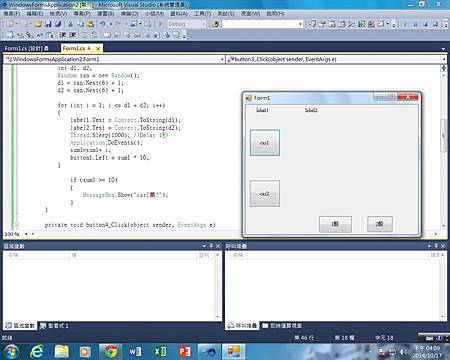
大富翁,賽車
今天寫了有關移動按鈕以外,配上顯示文字產生隨機數字
如同骰子一樣的玩法,將其發展成如同大富翁類型的遊戲
中間遇到很多的程式碼寫錯,少字少句,終於完成這次的課題
 

敏晟 發表在 痞客邦 留言(0) 人氣()

Timer control light.jpg
今天我們上了C#中延續上一次課程的小東西
加入了計時器(Timer)後,可以控制按鈕顏色及變化
感覺滿好玩的
老師要求我們設置成紅綠燈的模式

敏晟 發表在 痞客邦 留言(0) 人氣()

C#第一次上課
第一次使用C#的方式去做物體導向的作品,學習非常的重要,希望越來越進步
第一張圖片是學會以按鈕控制另一個按鈕的移動

第二張是玩玩看遊戲設置的Unity

敏晟 發表在 痞客邦 留言(0) 人氣()

1
Blog Stats
⚠️

成人內容提醒

本部落格內容僅限年滿十八歲者瀏覽。
若您未滿十八歲,請立即離開。

已滿十八歲者,亦請勿將內容提供給未成年人士。